Advanced Excel Skills for Finance Managers: The 2026 Strategic Guide
In 2026, a Finance Manager’s value doesn’t lie in calculating data, but in building the automated architectures that enable strategic foresight.
In this article
Ready to qualify online?
Get full access to expert-led ACCA & CIMA exam preparation with live tutor support.
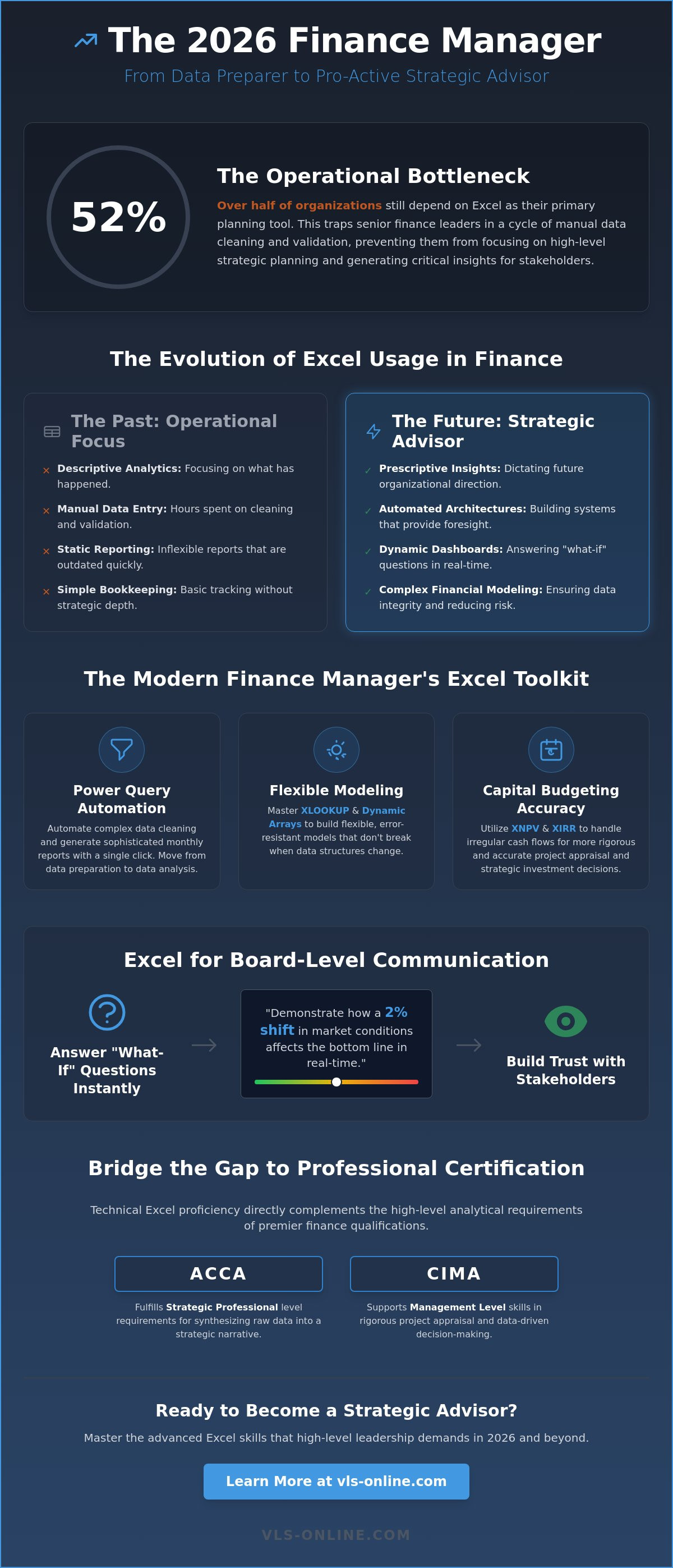
Explore Full AccessIn 2026, a Finance Manager’s value doesn’t lie in calculating data, but in building the automated architectures that enable strategic foresight. Despite the rise of specialized BI tools, 52% of organizations still rely on Excel as their primary planning application, yet many leaders remain trapped in manual data cleaning and validation. To break this cycle, mastering advanced excel skills for finance managers is the essential bridge between technical execution and high-level leadership. This level of proficiency ensures that your models aren't just functional; they're resilient enough to support complex, multi-variable decision-making at the highest levels of the enterprise.
We understand the frustration of spending hours on data validation when you should be generating insights for stakeholders. You deserve a workflow that operates with the same precision and stability you bring to your financial oversight. This strategic guide will teach you how to master predictive modeling and automated reporting, allowing you to transition from a data preparer to a pro-active strategic advisor. We’ll examine the integration of Python and AI within the latest Microsoft 365 environment to ensure your career remains at the forefront of the industry's evolution.
Key takeaways
- Understand the transition from descriptive data entry to prescriptive analytics to maintain a competitive edge in senior financial leadership roles.
- Master advanced excel skills for finance managers , focusing on Dynamic Arrays and XLOOKUP to build flexible, error-resistant financial models.
- Implement Power Query to automate complex data cleaning workflows and generate sophisticated monthly reporting packs with a single click.
- Enhance capital budgeting accuracy by utilizing advanced functions like XNPV and XIRR for more rigorous project appraisal and strategic decision-making.
- Explore how technical Excel proficiency directly complements the high-level requirements of the ACCA Strategic Professional and CIMA Management levels.
The Evolution of Excel in Finance Leadership: Beyond Data Entry
The finance function in 2026 has moved past the era of mere data aggregation. While junior staff focus on descriptive analytics, senior leaders are now expected to provide prescriptive insights that dictate organizational direction. Relying on standard spreadsheet functions creates a significant operational bottleneck. It traps managers in the mechanics of data cleaning instead of the logic of strategic planning. High-level financial leadership requires a shift where Excel serves as the critical interpretative layer between rigid ERP systems and the fluid requirements of the boardroom.
Investing in specialized training provides a measurable ROI through increased reporting accuracy and the elimination of manual reconciliation. It isn't just about speed; it's about the security of the data. For those pursuing the ACCA Strategic Professional level or high-level CIMA roles, the ability to synthesize raw data into a strategic narrative is non-negotiable. Excel remains the most versatile tool for this synthesis, provided the user has moved beyond the basics.
Strategic vs. Operational Excel Usage
Operational Excel often centers on simple bookkeeping and static reporting. In contrast, strategic usage involves complex variance analysis and the deployment of sophisticated financial modeling techniques. When a manager possesses advanced excel skills for finance managers, they don't just build a model; they build a professional safeguard. These advanced structures significantly reduce the risk of material misstatement by incorporating automated error checks and logical consistency that basic spreadsheets lack.
Excel as a Tool for Board-Level Communication
During high-stakes board meetings, the ability to answer "what-if" questions in real-time is a hallmark of an elite professional. Static reports are no longer sufficient for the fast-paced regulatory environment of 2026. Leaders use dynamic workbooks to demonstrate how a 2% shift in market conditions affects the bottom line instantly. This level of transparency builds immense trust with stakeholders. By maintaining advanced excel skills for finance managers, you ensure that every strategic recommendation is backed by a verifiable, rock-solid foundation, complete with rigorous audit trails and data integrity.
Core Advanced Formulas and Modeling Techniques for Managers
Technical mastery in 2026 requires more than a passing acquaintance with basic functions; it demands an architectural approach to spreadsheet design. For a leader, the goal is to create models that are both transparent to stakeholders and resilient against user error. Developing advanced excel skills for finance managers means moving beyond legacy tools like VLOOKUP in favor of XLOOKUP and Dynamic Arrays. These modern features allow for flexible data retrieval that doesn't break when columns are added, ensuring your financial reports remain stable during rapid business pivots.
Precision in capital budgeting is equally vital. Standard NPV and IRR functions often fail to account for the irregular cash flow timing common in complex projects. Utilizing XNPV and XIRR provides the granular accuracy required for rigorous project appraisal. By combining these with advanced logical nesting; such as IFS and the LAMBDA function for custom, reusable formulas; you create a sophisticated professional protective net around your calculations. For those looking to refine these technical nuances, our Advanced Excel for Accountants course provides the structured framework needed for such precision.
Dynamic dashboarding also relies on the strategic use of INDIRECT and OFFSET. These functions enable you to build ranges that expand or contract based on the reporting period. This eliminates the need for manual range adjustments each month, allowing you to focus on the strategic implications of the data rather than the mechanics of the workbook.
Financial Modeling Best Practices
A robust "Three-Statement Model" is the cornerstone of corporate finance. It's essential to build these models with scalability in mind, ensuring the Income Statement, Balance Sheet, and Cash Flow Statement are logically closed and self-balancing. Implementing sensitivity analysis through Data Tables and Scenario Manager allows you to stress-test your assumptions, providing the board with a range of outcomes rather than a single, potentially misleading figure.
Advanced Data Validation and Error Trapping
Protecting the integrity of your work is a managerial priority. Use advanced data validation and input controls to ensure junior staff don't inadvertently compromise complex logic. Conditional formatting serves as an automated sentinel, highlighting financial anomalies or budget overruns the moment they occur. This proactive approach to error trapping ensures that your workbooks remain a source of truth for the entire organization.
Data Automation and Visualization: The 2026 Standard
In the modern finance department, manual data manipulation is a professional liability. Power Query has emerged as the definitive tool for managers to handle massive datasets without the risk of manual entry errors. By automating the extraction and transformation process, you ensure that your reporting is consistent, verifiable, and structurally sound. This shift is a core component of advanced excel skills for finance managers, as it moves the focus from the mechanics of data collection to the logic of strategic insight.
The goal is to build a system where monthly reporting packs update with a single click. Achieving this requires a move toward advanced Pivot Table techniques, such as calculated fields, which allow for complex ratio analysis directly within the reporting layer. When these tools are integrated with Power BI, the result is a seamless flow of information from raw ERP data to high-level executive summaries that command authority in the boardroom.
The Manager’s Guide to Power Query
Consolidating data from disparate entities or multiple currency sources used to require hours of manual copy-pasting. Power Query allows you to create repeatable data transformation "recipes" that clean and merge this information automatically. These workflows provide a level of operational stability that manual spreadsheets cannot match, ensuring that your data integrity remains uncompromised regardless of the volume of information being processed.
Designing High-Impact Financial Dashboards
Visualization serves as the final bridge to executive understanding. Effective storytelling requires choosing the right chart for specific KPIs while reducing visual clutter to focus on variance and performance drivers. Interactive elements like Slicers enable stakeholders to explore the data themselves, fostering a culture of transparency. To master these automation workflows and elevate your reporting standards, explore our Advanced Excel for Accountants course today.
Bridging the Gap: Excel Mastery and Professional Certification
Technical proficiency is not an isolated skill; it acts as a multiplier for professional qualifications. Professionals who combine advanced excel skills for finance managers with prestigious certifications like ACCA or CIMA command the highest market value in the 2026 landscape. This synergy demonstrates both theoretical depth and the practical ability to execute complex financial strategies. While a certification proves your knowledge of the rules, Excel mastery proves your ability to apply them in a high-pressure, data-driven environment.
In the context of ACCA Advanced Financial Management (AFM), Excel is indispensable for mastering investment appraisal and business valuations. The ability to build automated sensitivity models mirrors the analytical rigour required at the Strategic Professional level. When technical mastery is paired with the CIMA Management Level, it enables a manager to move from descriptive bookkeeping to prescriptive strategic leadership. This dual capability ensures that every recommendation made to the board is backed by a verifiable, rock-solid foundation.
Excel for Strategic Business Reporting (SBR)
The transition to digital exam environments means that preparing for Strategic Business Reporting (SBR) requires high-level spreadsheet fluency. You must apply sophisticated Excel techniques to complex group accounting and consolidation tasks under strict time constraints. Practicing these advanced spreadsheet functions ensures that the mechanics of the software don't hinder your ability to demonstrate professional judgment. It allows you to focus on the nuances of financial reporting standards rather than the struggle of manual entry.
Professional Development with Vertex Learning Solutions
We provide a structured professional protective net through our Advanced Excel for Accountants course. This curriculum is specifically designed to bridge the gap between basic spreadsheet usage and the requirements of senior leadership. Our tutor-supported ACCA courses integrate these practical technical skills with exam success. This holistic approach ensures you aren't just passing an exam; you're building the operational stability and strategic foresight required to lead a finance department with absolute confidence.
Securing Your Strategic Future in Financial Leadership
The role of the finance manager has evolved into a strategic partnership with the board. Success in 2026 relies on your ability to automate the mundane and focus on prescriptive analytics. By mastering advanced excel skills for finance managers, you ensure that your financial models are not only accurate but also resilient against the complexities of a volatile market. We've explored how tools like Power Query and sophisticated modeling techniques provide the operational stability required for elite performance.
To solidify your position at the forefront of the industry, you must align these technical capabilities with recognized global standards. Upgrade your career with our Professional Certification Packages, which feature a specialized Advanced Excel for Accountants module. You'll benefit from the guidance of our London-based expert tutors and dedicated WhatsApp support for active learners. This structured approach provides the professional protective net you need to master both the exam environment and real-world strategic challenges. Your path to senior leadership is built on this foundation of technical and professional excellence.
Frequently Asked Questions
Which is better for finance managers: VLOOKUP or XLOOKUP?
XLOOKUP is the definitive choice for modern financial professionals due to its inherent resilience and flexibility. Unlike its predecessor, it defaults to exact matches and eliminates the risk of model failure when new columns are inserted into a dataset. This structural stability is essential when managing complex workbooks where data integrity is paramount. It allows you to search both vertically and horizontally with a single, streamlined function that legacy tools simply can't match.
Do I need to learn VBA and Macros in 2026?
While VBA remains relevant for maintaining legacy systems, it's no longer the primary tool for automation in 2026. The shift toward Power Query and Office Scripts has simplified complex workflows without the need for extensive coding. Finance managers should prioritize mastering these modern environments to ensure their automation strategies remain scalable and easily auditable. This approach provides a more secure professional protective net for the organization's data while reducing technical debt.
How does Excel proficiency impact ACCA exam performance?
Proficiency in spreadsheet functions directly correlates with success in ACCA Computer Based Exams, particularly at the Strategic Professional level. Mastering advanced excel skills for finance managers allows you to execute complex calculations rapidly, leaving more time for the critical evaluation and strategic recommendation phases of the exam. This technical fluency reduces cognitive load and ensures that software mechanics don't impede your ability to demonstrate professional judgment under intense time pressure.
What are the most important Excel skills for a CFO transition?
Transitioning to a CFO role requires a shift from data processing to strategic architecture. You must master multi-scenario modeling and sensitivity analysis to provide the board with a range of financial outcomes rather than static figures. Additionally, the ability to build high-level executive dashboards that distill complex datasets into actionable KPIs is vital for driving organizational strategy. These skills ensure you can lead with data-driven confidence while maintaining absolute stakeholder trust.
Can Power Query replace traditional Excel formulas for finance?
Power Query is designed to replace the formulas traditionally used for data cleaning and transformation, such as nested IF statements or complex text manipulations. However, it doesn't replace the core modeling formulas required for deep financial analysis, such as XNPV or XIRR. The most effective managers use Power Query to prepare a clean, reliable data foundation before applying analytical formulas within the Excel grid to generate the strategic insights required for leadership decision-making.