
Advanced Excel for Accountants: 2026 Career Guide
Future-proof your career with our Advanced Excel for Accountants course. Master automation, Power Query, and data analysis to become a strategic leader by 2026.

In this article
Ready to qualify online?
Get full access to expert-led ACCA & CIMA exam preparation with live tutor support.
Explore Full AccessBy 2026, the distinction between a traditional bookkeeper and a strategic financial leader will be defined by a single factor: the ability to command data rather than merely record it. You likely spend far too many hours manually reconciling spreadsheets, all while a quiet anxiety lingers about a single hidden error compromising your entire financial model. It's a common frustration to feel sidelined by automated tools like Power Query that seem to promise efficiency but often deliver complexity. Our Advanced Excel for Accountants course is designed to bridge this gap, providing the technical safety net you need to master high-level automation and transition into a strategic advisory role. You'll gain the confidence to manage massive datasets and earn a certification that validates your professional expertise. This guide explores the essential functions and systems you must master to future-proof your career.
The Strategic Shift: Why Advanced Excel is Non-Negotiable in 2026
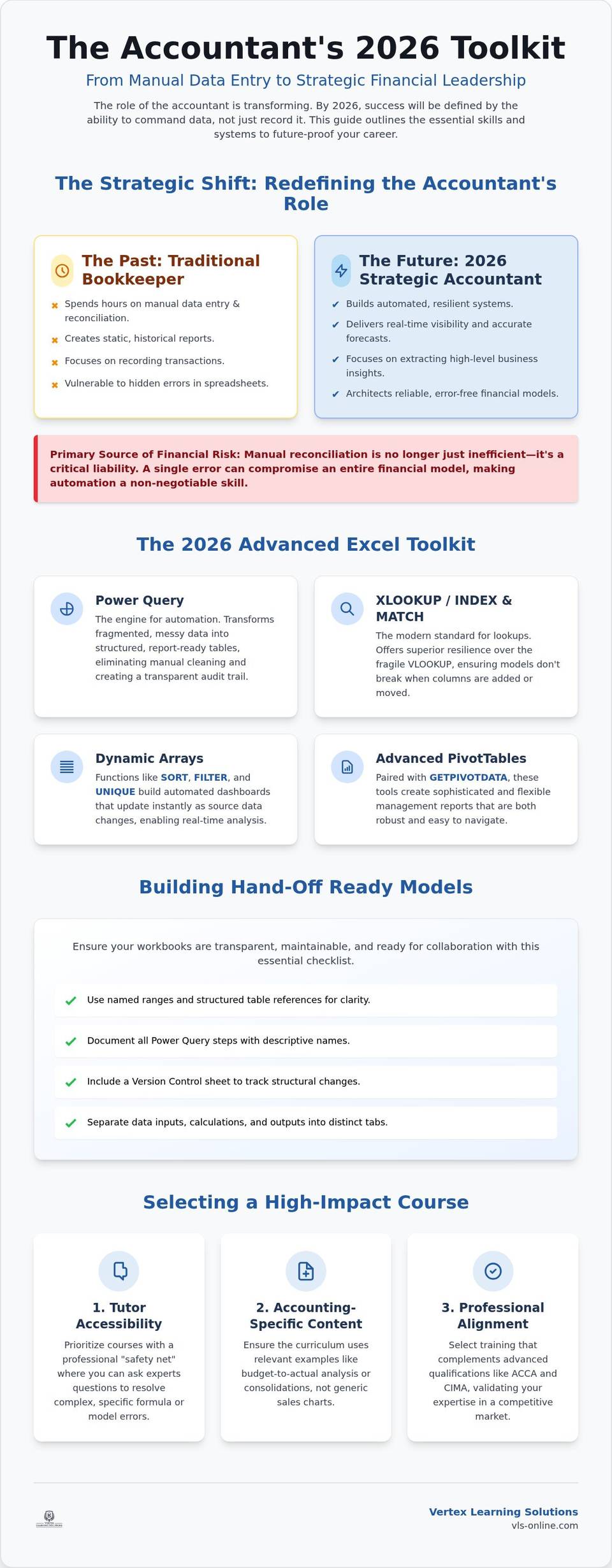
The role of the modern accountant is undergoing a fundamental transformation. By 2026, the professional landscape will no longer reward mere data recording. Instead, the industry prioritizes the "Strategic Accountant" who leverages automation to extract high-level business insights. This shift is driven by the reality that manual reconciliation has become the primary source of financial risk in modern firms. A single misplaced decimal or an overlooked cell reference can compromise the integrity of an entire reporting cycle. Relying on manual entry is no longer just inefficient; it is a liability that proactive professionals must address through a structured Advanced Excel for Accountants course.
Key takeaways
- Understand why manual reconciliation is the primary source of financial risk and how automation shifts your role toward strategic business insights.
- Learn to utilize Power Query and advanced functions to transform fragmented data into structured, error-free financial reports.
- Identify the critical criteria for selecting an Advanced Excel for Accountants course, focusing on tutor support and accounting-specific practical application.
- Gain the technical proficiency and certification required to complement professional qualifications like ACCA and CIMA in a competitive 2026 market.
In the 2026 employment market, mastery of Microsoft Excel has evolved from a competitive advantage into a baseline requirement for senior positions. Employers now seek candidates who can build resilient systems rather than those who simply populate them. Enrolling in a specialized Advanced Excel for Accountants course provides the structured framework needed to navigate these technical complexities with precision. This technical proficiency is also a critical success factor for candidates pursuing ACCA Applied Skills, where the ability to manipulate data accurately under pressure is essential for both exam success and professional practice.
Moving Beyond Data Entry to Financial Intelligence
Transitioning from a traditional bookkeeper to a strategic analyst requires a significant shift in mindset. While the bookkeeper focuses on the manual entry of transactions, the analyst adopts a system-building approach. By creating automated workflows, you move beyond the constraints of static reports. These advanced skills enable real-time visibility into financial performance and significantly more accurate forecasting. Building these robust frameworks ensures that your data remains clean, your logic stays transparent, and your professional value remains unassailable in an increasingly automated world.
Core Competencies: The 2026 Advanced Excel Toolkit
Mastering a modern toolkit is essential to bridge the technological skills gap of accounting graduates and seasoned professionals alike. Your first priority should be Power Query. This engine transforms fragmented data exports into structured tables, effectively eliminating manual cleaning. Once your data is clean, you must transition from VLOOKUP to XLOOKUP or the INDEX and MATCH combination. These functions offer superior resilience against column insertions, ensuring your financial models remain error-free during structural changes. Our Advanced Excel for Accountants course provides the practical environment to refine these techniques under expert guidance.
Efficiency in 2026 also relies on Dynamic Arrays. Functions such as SORT, FILTER, and UNIQUE allow you to build automated dashboards that update instantly as source data changes. When paired with Advanced PivotTables and the GETPIVOTDATA function, these tools enable the creation of sophisticated management reports that are both flexible and robust. These competencies ensure you aren't just calculating numbers, but architecting reliable financial systems.
Automating the Audit Trail with Power Query and VBA
Power Query is arguably the most significant development in Excel's history for the accounting profession. It creates a transparent, repeatable audit trail for every data transformation. While traditional Macros and VBA remain vital for desktop automation, you should consider Office Scripts for cloud-based environments. To ensure your workbooks are hand-off ready, follow this essential checklist:
Use named ranges and structured table references for clarity.
Document all Power Query steps with descriptive names.
Include a Version Control sheet to track structural changes.
Separate data inputs, calculations, and reporting outputs into distinct tabs.
Following these protocols ensures your models remain functional long after they leave your screen.
Selecting the Best Advanced Excel for Accountants Course
Identifying the right Advanced Excel for Accountants course requires looking beyond the basic curriculum. While many providers offer static videos, these often fail when you encounter a specific error in a complex financial model. You should prioritize tutor accessibility. It's vital to have a professional safety net where you can ask questions when a nested formula returns an unexpected result. Ensure the curriculum uses accounting-specific examples. Learning through budget-to-actual analysis or consolidation exercises is far more valuable than studying generic sales charts that don't reflect the nuances of the profession.
Selecting an Advanced Excel for Accountants course is a strategic investment in your professional stability. Your technical training must align with international standards. A high-quality curriculum should complement advanced qualifications like the ACCA Strategic Professional level. This ensures that the logic you build in Excel mirrors the strategic requirements of global accounting practices. The "Vertex Advantage" lies in this integration. We combine recorded expertise with live weekly interaction, ensuring you aren't just watching a screen, but participating in a structured development process.
The Vertex Learning Solutions Support Ecosystem
Our approach centers on providing a secure professional environment. We offer active WhatsApp tutor support to help you resolve real-world blocks as they happen. This direct line to expertise prevents the frustration of being stuck on a single line of code or a Power Query step. Weekly live sessions further enhance this by simulating a classroom environment. These sessions are designed to clarify complex logic and ensure you retain the skills needed for senior roles. You can view our full range of ACCA and specialist courses to see how we integrate technical Excel mastery with professional qualification support.
Mastering the Digital Architecture of Finance
The transition to a strategic analyst role requires a fundamental shift from manual entry to system architecture. By commanding Power Query and dynamic arrays, you eliminate the inherent risks of manual reconciliation and provide the high-level insights modern firms demand. This evolution provides the professional safety net required to excel in senior positions. You'll benefit from dedicated tutor support via WhatsApp and live weekly sessions tailored specifically for ACCA and CIMA career paths. These resources ensure that your technical growth remains structured and supported by expert guidance. Don't allow a skills gap to define your professional ceiling. Enroll in the Advanced Excel for Accountants course today and secure your position as a strategic leader in the 2026 financial landscape. Your path to professional excellence starts here.